 ChatGPT
CampaignStack with ChatGPT: the assistant you already use, with a LinkedIn system behind it
ChatGPT writes a good first message and a good reply. What it cannot do from a chat window is hold a LinkedIn session, remember that this person answered four days ago, stay under a per-account daily budget, or stop the sequence when someone books a call. CampaignStack is that system, and it exposes every capability to ChatGPT as an MCP connector. This page is the setup: one switch, one URL, one approval.
Paste a profile and a reason to write and you get a message worth sending. Paste a thread and you get the reply. It will turn a messy offer into three angles and argue with you about which one lands. With browsing and a connector or two it already reaches into the rest of your stack. None of that is in question here, and CampaignStack itself uses an OpenAI model to generate campaigns.
A chat has no memory of last Tuesday's send, no proxy, no session that survives the tab, no count of how many invitations went out this week and no way to notice that someone replied overnight. Every one of those is state, and state is what an outreach system is made of. Writing the message is the easy half; everything that has to be true before and after it goes is the other half.
The same job, with and without the system underneath
Left is ChatGPT in a chat window with the tools it ships with. Right is the same ChatGPT with the CampaignStack connector switched on, which is 100+ customer-facing tools that already know your workspace.
| ChatGPT alone | ChatGPT with CampaignStack | |
|---|---|---|
| Writing the message | Strong. Paste the profile, get a draft. Paste the thread, get the reply. | The same kind of draft, now with the lead's stored signals, the workspace playbook and the sender's own voice in the prompt, then a critic pass before a human sees it. |
| Sending on LinkedIn | Nothing native. A browser or a scraping connector clicks Send on your IP, with nothing counting how often. | A persistent browser per account behind its own residential proxy, with per-action daily budgets, a weekly invitation cap paced across the week, and business-hour windows. |
| Knowing who replied | Only what you paste in. There is no poller and no memory between conversations. | The inbox is polled, a reply cancels the queued touches for that lead, and the thread is handed to a conversation node that keeps listening until it goes quiet. |
| Sourcing and scoring | It reasons about fit from what you paste. It cannot search LinkedIn, enrich a profile or score 4,000 leads against an ICP. | Search, post engagement, group members and CSV imports land in one lead bus, get enriched and are scored against every ICP in the workspace. |
| Stopping at the right time | It stops when you close the tab. Nothing tells it a meeting was booked. | A booked meeting cancels that lead's queued touches workspace-wide, a reply reroutes, and a block signal pauses the whole action family for a day. |
| Being reviewed | You are the review, one message at a time, in the chat. | Every AI draft parks in a review queue with the reason it was flagged, if it was. Approve, edit, reject, and the edits teach the workspace. |
Connect ChatGPT in four steps
The MCP server is hosted and signs people in itself, so there is nothing to install and no key to paste. You switch developer mode on, give ChatGPT the URL, approve the connection on a CampaignStack screen, and enable the connector in a chat.
- 1
Turn on developer mode
- Custom MCP connectors are a developer feature, so ChatGPT keeps them behind a switch. Open Settings and look for developer mode; OpenAI has moved it between the apps section and the security section, so search the settings pane rather than a fixed path.
- On a Business or Enterprise workspace an admin turns it on first, under the workspace permissions. It is available on the paid plans, not on the free one.

Developer mode, switched on in ChatGPT settings. - 2
Add CampaignStack as a connector
- In the apps and connectors list, create a new one and give it a name people on your team will recognise. CampaignStack is a fine one.
- For the connection, paste the server URL below. It ends in /mcp, which is the streamable HTTP endpoint ChatGPT expects. There is no tunnel to set up: the server is public and hosted.
- Leave the authentication choice on OAuth. ChatGPT reads the server's own metadata, registers itself and sends you to CampaignStack to approve, which is step 3. There is no key to paste.
- Create the connection. ChatGPT lists the tools it discovered, each with a read-only or write marker and its own approval setting.
NameCampaignStackRemote MCP server URLhttps://mcp.campaignstack.io/mcp
The new connector form: a name and the MCP server URL. 
The tools ChatGPT discovered, each with its approval setting. - 3
Approve the connection on your own screen
- The tab that opens is CampaignStack, not OpenAI. Sign in if you are not already; you come straight back afterwards.
- The screen names the app asking and the address it sends you back to, then lists what the connection can do: read your workspace, create and edit, and send on your connected accounts.
- Click "Connect". ChatGPT gets a token, never your password, and the connection covers every workspace you are a member of, with exactly the permissions your role already has.
- Revoke it whenever you like from Settings, Connections: campaignstack.io/dashboard?settings=connected-apps. It stops working within seconds.
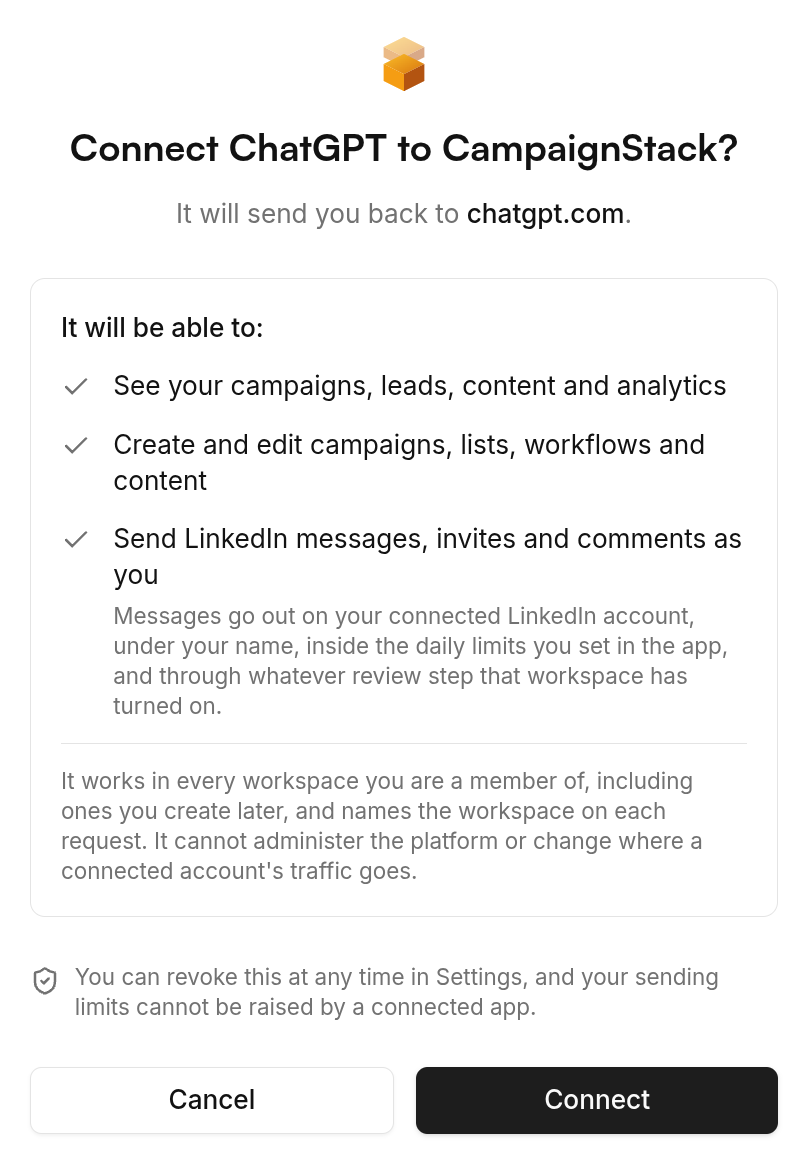
The CampaignStack consent screen: what the connection can do, and where it sends you back. ChatGPT warns you that a connector can act on your behalf and that content it reads can try to steer it. That warning is right, and it is the reason the write side of CampaignStack has its own gates: a send leaves under the account's daily budget, inside business hours, and through whatever review step the workflow has turned on.
- 4
Turn it on in a chat and ask what it can do
- Connectors are per conversation. Open the tools menu next to the message box and switch CampaignStack on, then ask the question below.
What can you do with the CampaignStack connector?
The connector enabled in a chat, answering with the tool groups it can reach. Then a real read. It calls whoami, lists your workspaces and campaigns, and reads the review queue. Every write goes through the same budgets and review gates as a click in the UI.
Call campaignstack_whoami, then list my workspaces and campaigns. For the first campaign, show the pending reviews and tell me which drafts you would approve and why.Cursor, Claude Desktop, n8n and anything else that speaks MCP take the same URL. The docs site carries a page per client, plus the scope matrix and the API key route for clients that cannot do OAuth: Use with any AI, Quick start, Scopes, API keys.
A model is not a system of record
The question people actually ask is why they cannot just do this in ChatGPT directly. They can do the writing part, and it is the smaller part. Outreach is a set of facts that have to stay true over weeks: who was contacted from which account, what they said back, which invitations are still pending, how many actions went out today, who asked never to be written to again. A chat window keeps none of that between sessions, and pasting it back in every morning is the job the tool was supposed to remove.
CampaignStack keeps those facts and exposes them as tools. The model is the one you already talk to; what changes is that its tool calls land on a workspace with memory, safety budgets and a review queue instead of on a browser tab with none of them.
Your own permissions, and never more
The connection acts as you. It sees the workspaces you are a member of and can do in each one what your role lets you do; an owner-only action stays refused where you are only a member. Reading covers campaigns, leads, the inbox and analytics. Writing covers creating and editing campaigns, lists, workflows and content. Sending is listed separately on the consent screen because it is the line that reaches a person, and platform administration and proxy settings are not on the list at all: an OAuth connection can never hold them.
Nothing in a write permission skips the safety layer. A send ChatGPT triggers is gated by the same per-account daily budget as a send from the UI, paced the same way, and an AI draft it asks for still parks for review if the workflow says so. Revoke the connection under Settings, Connections and it stops working within seconds.
Read the profile, do not obey it
A connector reads text other people wrote: profiles, posts, replies, whatever a lead put in a link. OpenAI says plainly that such content can try to steer an assistant, and that is true of every tool on this page. The answer is not a promise to be careful. Content that comes off the public web reaches a prompt only inside a fenced block marked as data, with the instruction-looking parts neutralized, and the actions that reach a person sit behind budgets, business hours and a review queue that a model cannot talk its way past.
That is also why the default for a new workspace is review mode. The first week is worth watching, whichever assistant is driving.
Frequently asked questions
Which ChatGPT plans can add a custom connector?
The paid ones. Custom MCP connectors live behind developer mode, which OpenAI ships on its paid consumer and business plans and not on the free tier. On a Business or Enterprise workspace an admin has to allow it before members see the switch.
Is this the same connector as the Claude one?
The same server, the same URL and the same consent screen. CampaignStack is one MCP server; Claude, ChatGPT, Cursor and anything else that speaks the protocol are clients of it. Connecting both means two connections on your account, each revocable on its own.
Can ChatGPT send a LinkedIn message without me seeing it?
Only if the workflow it is acting in is set to send automatically, and only inside that account's daily budget and business hours. In the default review mode every AI draft parks for a human. ChatGPT can approve a draft from the review queue, which is a deliberate act with a tool name in the audit log, the same as clicking Approve.
Do I still need an API key?
Only for a client that cannot sign in over OAuth, such as a webhook runner or a script. Those still take a csu_ key in an x-api-key header, minted from the API keys page and revocable there.
What does connecting cost?
The connection is included in the workspace plan. Actions ChatGPT triggers have the same credit costs as the UI: 10 for a LinkedIn write and 5 for an AI draft. Profile enrichment from an existing LinkedIn URL costs 0 credits. Identity finding costs 10 only when found; email and phone finding cost 10 and 50 per found result. The free plan includes 100 credits a day that do not roll over; a paid workspace includes 15,000 credits per month.
Do I need a website or a campaign before connecting?
No. A workspace with nothing in it is a fine place to start the conversation: the onboarding tool lets the assistant fill in the offer, the personas and the first campaign from what you tell it.
Every claim about the vendor on this page was checked against these pages on its own site:


Get started
Your clients' next meetings start here.
Connect an account, describe the customer, and the first drafts are waiting the next morning. Approve them by hand until you would rather not.