 Claude
CampaignStack with Claude: the writer and the system that sends
Claude already writes a good LinkedIn message. That is the part people have. What it cannot do from a chat window is hold a LinkedIn session, know that this person replied four days ago, stay under a per-account daily budget, or stop the sequence when someone books. CampaignStack is that system, and it exposes every capability to Claude as an MCP tool. This page is the setup: paste one URL, approve one screen, ask one question.
Give Claude a profile, a company page and a reason to write, and it produces a message a human would send. It reads a thread and drafts the reply. It turns a rambling offer into three clean angles. In Claude Code and claude.ai it can call tools, so with a browser tool it can even open LinkedIn. CampaignStack itself drafts lead-facing messages with Claude models, so nothing here argues that another model writes better.
A chat has no memory of last Tuesday's send, no proxy, no cookie that survives the session, no count of how many invitations went out this week and no way to notice that a lead replied while you were asleep. Every one of those is state, and state is what an outreach system is. Claude writing the message is the easy half. The hard half is everything that has to be true before and after the message goes.
The same job, with and without the system underneath
Where the work actually lands. Left is Claude in a chat window with the tools it ships with. Right is Claude with the CampaignStack MCP server connected, which is Claude with 100+ customer-facing tools that already know your workspace.
| Claude alone | Claude with CampaignStack | |
|---|---|---|
| Writing the message | Excellent. Paste the profile, get a draft. Paste the thread, get the reply. | The same model, now with the lead's stored signals, the workspace playbook and the sender's own voice in the prompt, then a critic pass before a human sees it. |
| Sending on LinkedIn | Nothing native. A browser tool can click Send, on your IP, with no limit on how often. | A persistent browser per account behind its own residential proxy, with per-action daily budgets, a weekly cap paced across the week, and business-hour windows. |
| Knowing who replied | Only if you paste the inbox in. Claude has no poller and no memory between sessions. | The inbox is polled, a reply cancels the queued touches for that lead, and the thread is handed to a conversation node that keeps listening. |
| Sourcing and scoring | It can reason about fit from what you paste. It cannot search LinkedIn, enrich a profile or score 4,000 leads against an ICP. | Search, post engagement, group members and CSV imports land in one lead bus, get enriched and are scored against every ICP in the workspace. |
| Stopping at the right time | It stops when you close the tab. Nothing tells it a meeting was booked. | A booked meeting cancels the lead's queued touches workspace-wide; a reply reroutes; a block signal pauses the action family for a day. |
| Being reviewed | You are the review, one message at a time, in the chat. | Every AI draft parks in a review queue with the reason it was flagged, if it was. Approve, edit, reject, and the edits teach the workspace. |
Connect Claude in three steps
The MCP server is hosted, so there is nothing to install on your side, and since it signs people in itself there is no key to mint and no header to paste. You give Claude the URL, approve the connection on a CampaignStack screen, and ask it what it can see. The Claude app, Claude Code and any other MCP client all take that same URL; pick yours in step 1.
- 1
Point Claude at the server
- In a chat, click the "+" next to the message box, then Connectors, then Add connector, then Add custom connector. The same list lives in Settings under Connectors.
- Give it a name for your own connectors list and paste the server address below, then click Continue.
- The next screen comes back already filled in: Authentication reads "Always required" marked Detected, and the OAuth client is set to register one automatically. Leave both. There is no header to add and nothing to change under Advanced. Click Add.
- Claude hands you to CampaignStack to sign in and approve, which is step 2. If it does not open by itself, use the Connect button on the connector.
NameCampaignStackRemote MCP server URLhttps://mcp.campaignstack.io/mcp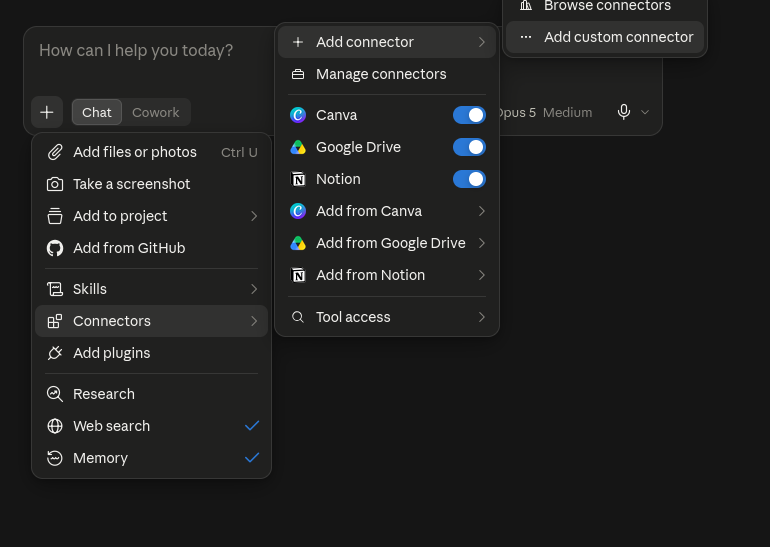
The "+" menu: Connectors, then Add connector, then Add custom connector. 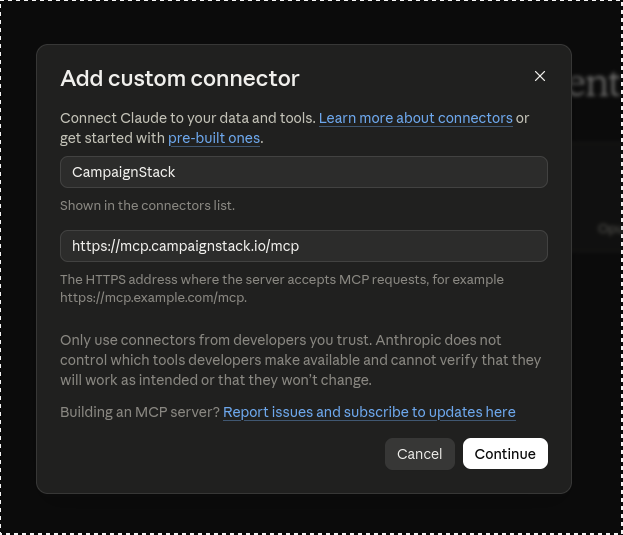
Add custom connector: a name and the HTTPS address of the server, then Continue. 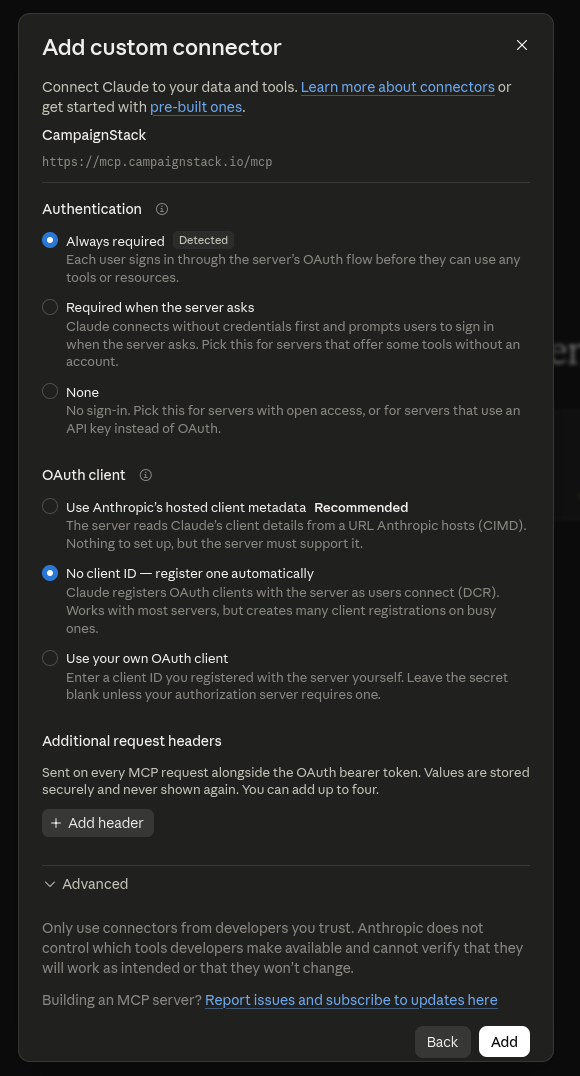
The second screen, detected and filled in: sign-in always required, and a client registered automatically. - 2
Approve the connection on your own screen
- The tab that opens is CampaignStack, not Claude. Sign in if you are not already; you come straight back here afterwards.
- The screen names the app asking and the address it sends you back to, then lists what the connection can do: read your workspace, create and edit, and send on your connected accounts.
- Click "Connect". Claude gets a token, never your password, and the connection covers every workspace you are a member of, exactly as your own account does.
- Revoke it whenever you like from Settings, Connections: campaignstack.io/dashboard?settings=connected-apps. It stops working within seconds.
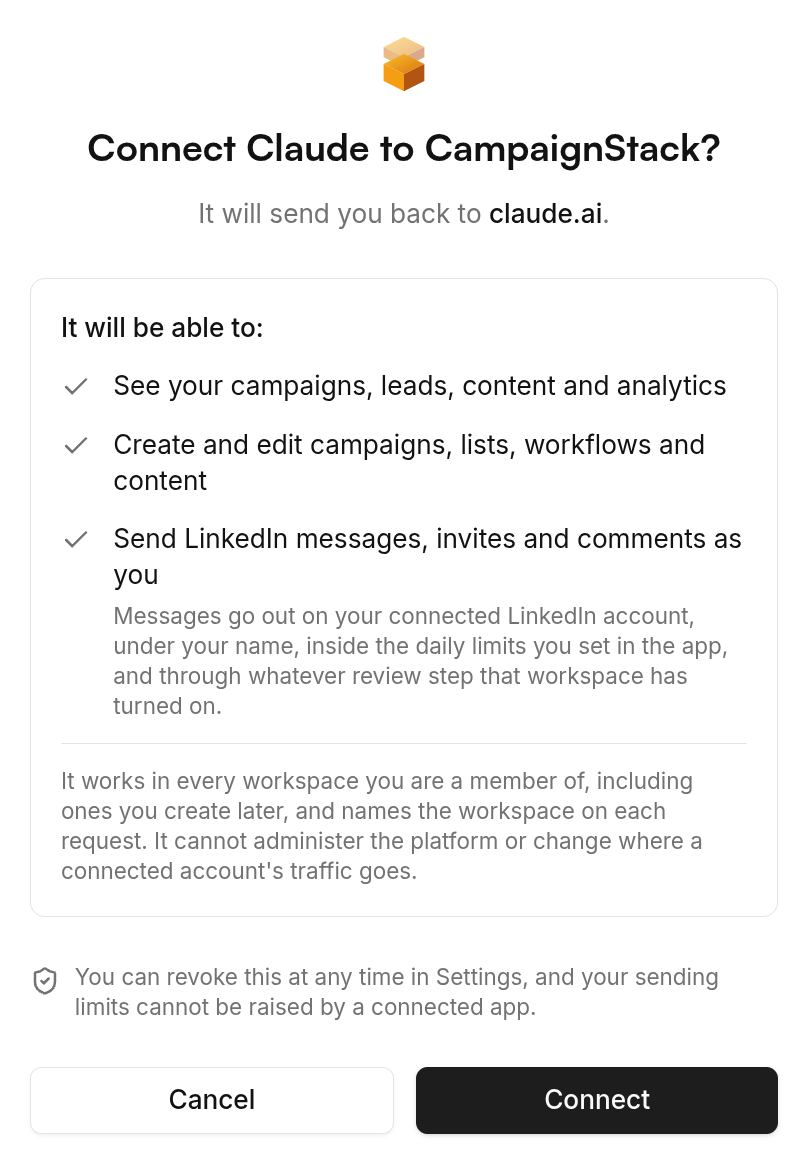
The CampaignStack consent screen: what the connection can do, and where it sends you back. 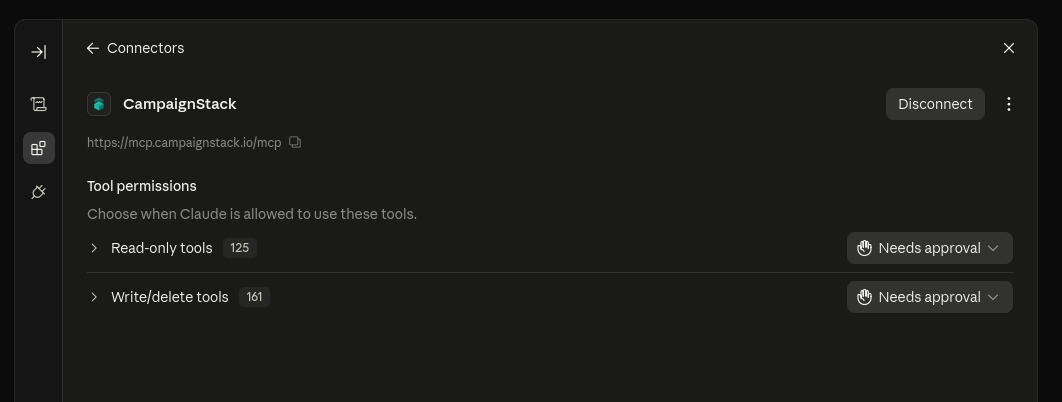
Connected: the read-only and write tool groups, each with its own approval setting. Sending is its own line on that screen and stays a separate decision. Whatever you approve, a message still leaves under the account's daily budget, inside business hours, and through whatever review step the workflow has turned on.
- 3
Ask it what it can do
Start with the question below. Claude reads the tool list and answers with what it can actually do in your workspace, grouped: campaigns and targeting, leads and enrichment, outreach and workflows, inbox, signals, content and ads, SEO. That answer is the map for everything after.
What can you do with CampaignStack MCP?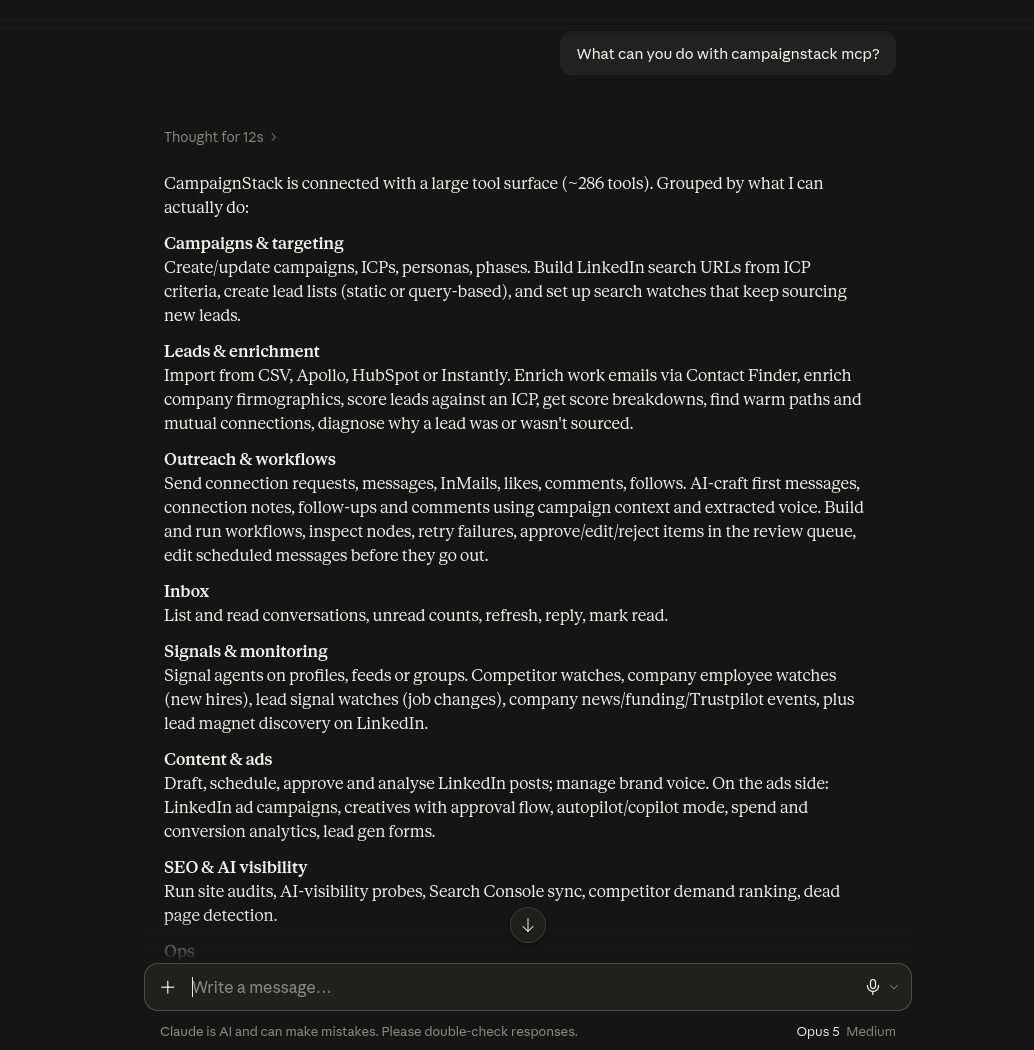
Claude's answer to the first question: every tool group it can reach through the connector. Then a real read. Claude calls whoami, lists your workspaces and campaigns, and reads the review queue. From there it can source a list, draft a campaign, approve drafts or explain why a lead is parked. Every write goes through the same budgets and review gates as a click in the UI.
Call campaignstack_whoami, then list my workspaces and campaigns. For the first campaign, show the pending reviews and tell me which drafts you would approve and why.Cursor, Claude Desktop, n8n and anything else that speaks MCP take the same URL. The docs site carries a page per client, plus the scope matrix and the API key route for clients that cannot do OAuth: Use with any AI, Quick start, Scopes, API keys.
A model is not a system of record
The question people actually ask is why they cannot just do this with Claude directly. The honest answer is that they can do the writing part, and it is the smaller part. Outreach is a set of facts that have to stay true over weeks: who was contacted from which account, what they said back, which invitations are still pending, how many actions went out today, who opted out. A chat window keeps none of that between sessions, and pasting it back in every morning is the job the tool is supposed to remove.
CampaignStack keeps those facts and exposes them as tools. That is the whole design. The model is the same one you already use; what changes is that its tool calls land on a workspace with memory, safety budgets and a review queue, instead of on a browser tab with none of them.
Your own permissions, and never more
The connection acts as you. It sees the workspaces you are a member of and can do in each one what your role lets you do; an owner-only action stays refused where you are only a member. Reading covers campaigns, leads, the inbox and analytics. Writing covers creating and editing campaigns, lists, workflows and content. Sending is listed separately on the consent screen because it is the line that reaches a person, and platform administration and proxy settings are not on the list at all: an OAuth connection can never hold them.
Nothing in a write permission skips the safety layer. A send Claude triggers is gated by the same per-account daily budget as a send from the UI, paced the same way, and an AI draft it asks for still parks for review if the workflow says so. Revoke the connection under Settings, Connections and it stops working within seconds. Membership changes take effect the same way, so a connection made while you were in a client's workspace stops seeing that workspace the moment you leave it.
CampaignStack drafts with Claude too
The messages CampaignStack writes for leads come from Claude models, with the workspace playbook, the lead's recent activity and the sender's own voice in the prompt, and a critic pass that reads the full brief and objects before a human sees the draft. So the relationship is not a choice between the two. Connecting Claude over MCP puts the model you already talk to in front of the system that already writes with it.
Frequently asked questions
Does this work with claude.ai, or only Claude Code?
Both. Claude Code adds the server with one command and then signs in from the /mcp menu. In claude.ai and Claude Desktop, custom connectors accept a remote MCP URL, and the CampaignStack server is remote and hosted, so you add the URL and click Connect. Any other MCP client that speaks streamable HTTP works the same way.
Can I run LinkedIn automation with Claude Code alone?
You can script it: Claude Code will drive a browser or call an API against your account without complaint. What that build lacks is what gets accounts restricted: no per-account daily budget, no weekly invitation cap paced across the week, no warm-up, your own IP on every request, and nothing that notices a reply and stops the sequence. Connecting Claude Code to the CampaignStack MCP server keeps the agent and adds that layer. The agent issues the same tool calls. Each one lands inside a budget, a business-hour window and, by default, a review queue.
Can Claude send a LinkedIn message without me seeing it?
Only if the workflow it is acting in is set to send automatically, and only inside that account's daily budget. In the default review mode every AI draft parks for a human. Claude can approve a draft from the review queue, which is a deliberate act with a tool name in the audit log, the same as clicking Approve.
Is the model inside CampaignStack the same Claude?
Lead-facing drafts use Claude models, with GPT and DeepSeek models in other roles such as campaign generation and the draft critic. Connecting your own Claude over MCP does not change which model drafts inside the product; it changes who is driving the product.
What does connecting cost?
The connection is included in the workspace plan. Actions Claude triggers have the same credit costs as the UI: 10 for a LinkedIn write and 5 for an AI draft. Profile enrichment from an existing LinkedIn URL costs 0 credits. Identity finding costs 10 only when found; email and phone finding cost 10 and 50 per found result. The free plan includes 100 credits a day that do not roll over; a paid workspace includes 15,000 credits per month.
Do I still need an API key?
Only for a client that cannot sign in over OAuth, such as a webhook runner or a script. Those still take a csu_ key in an x-api-key header, minted from the API keys page and revocable there. For Claude, in any of its surfaces, the key route is no longer the route.
Do I need a website or a campaign before connecting?
No. The browser extension can create an account and a key from LinkedIn alone, and Claude can then fill the workspace through the onboarding tool: offer, personas, first campaign. A workspace with nothing in it is a fine place to start the conversation.
Every claim about the vendor on this page was checked against these pages on its own site:


Get started
Your clients' next meetings start here.
Connect an account, describe the customer, and the first drafts are waiting the next morning. Approve them by hand until you would rather not.